Solutions
Get your evenings back. Let AI run the money.
The 11 PM reconciliation across three systems that never agree is not a thing you should still be doing. The AI makes the delivered job the single source of truth: when a tech closes a GPS-stamped visit, the customer's invoice, the card-on-file payment and the tech's pay line all come off that one record. Nothing to match, nothing to chase. The evening is yours.
It's the 31st, almost midnight. You're matching quotes to jobs to invoices to hours across three systems and a spreadsheet, and the totals are $400 apart — again. On loTouch there's nothing left to match: the delivered job already wrote the invoice, charged the card and filled in the pay line. The lights in the office are off and you're home.
What is AI invoicing and payroll software?
AI invoicing and payroll software turns each delivered job into the customer's invoice, the card-on-file payment and the tech's pay line from one record. loTouch closes that loop end to end: the AI bills GPS-stamped completed visits automatically, flows on-site quotes into the same record, and reconciles revenue and labour as the work happens — so there's nothing left to match at 11 PM on the 31st.
In the product
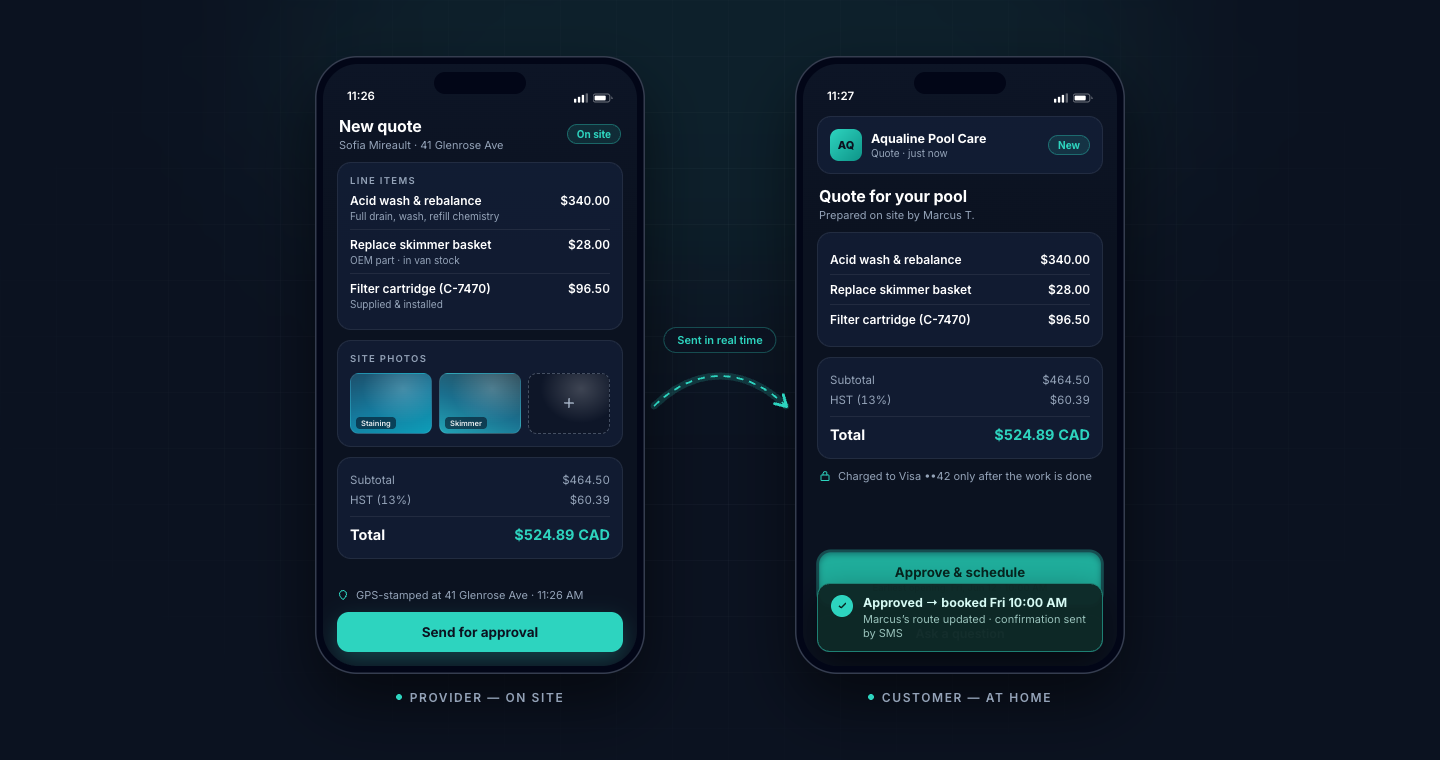
Approved at the door, billed from one record
An add-on quoted in the provider app, approved in the customer's — and the moment the job closes, the invoice, the card-on-file charge and the provider's pay line all come off that same record.
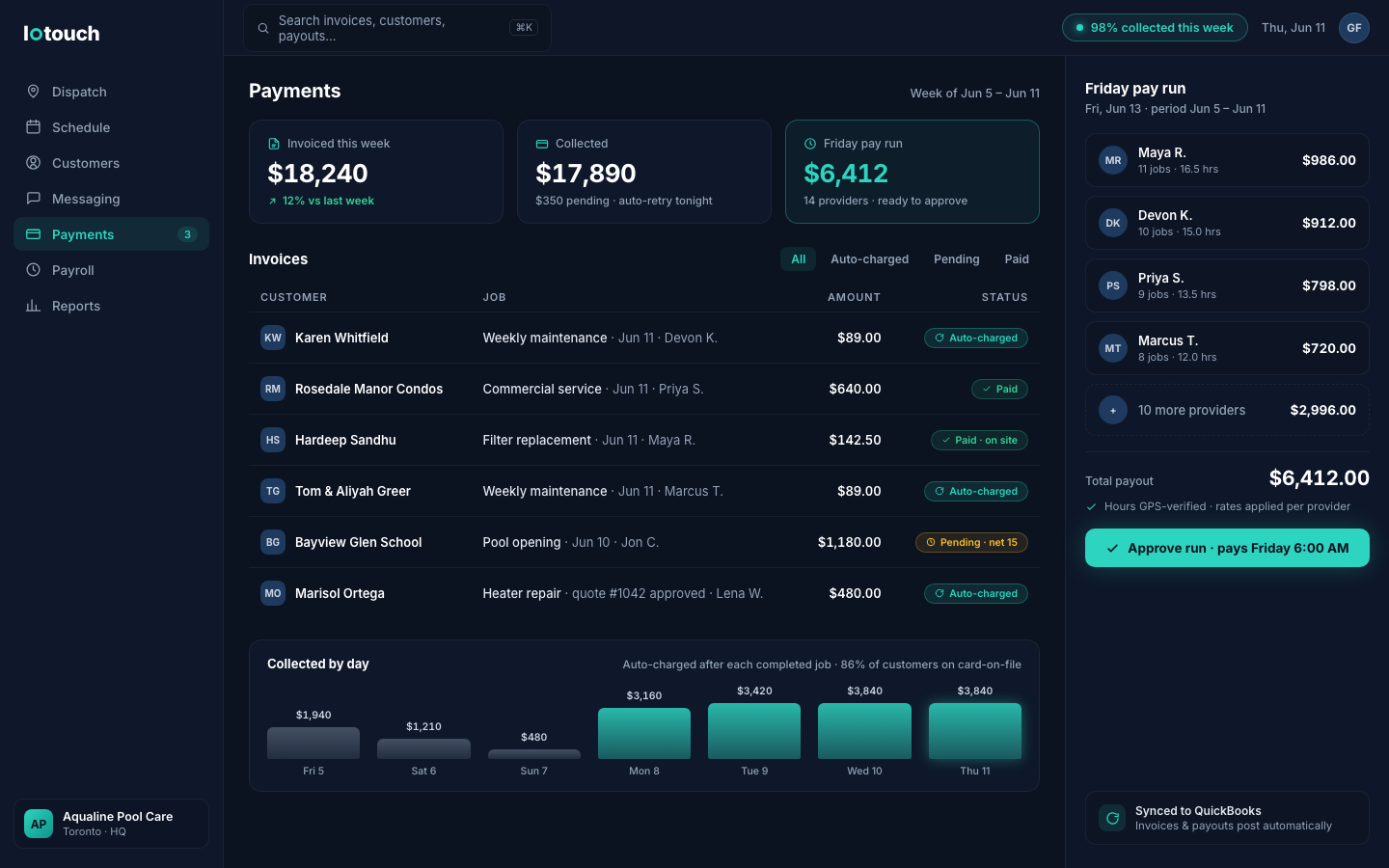
Invoiced, collected, paid out — one Friday button
The week's invoices auto-charge as jobs close, the pending ones retry themselves, and Friday's pay run — GPS-verified hours, per-provider rates, QuickBooks-synced — is one approval.
Capabilities
What loTouch does for you
One record, three outputs
When the tech marks a job delivered — GPS-stamped, proof captured in the app — the AI drives the customer's invoice, the payment and the tech's payroll line off that one record. Revenue and labour reconcile themselves as the work happens, instead of waiting for you on the 31st.
Card-on-file and tap payment
Completed visits charge the card on file the moment they close, or take tap payment at the door. Recurring plans, one-off jobs and quoted add-ons all settle through the same trail — no chasing money, no awkward phone calls, no '10 hours a week' lost to collections.
Quotes that flow straight to billing
On-site quotes built in the tech app are approved digitally by the customer, convert to scheduled work, and bill on the same record — so the add-on agreed to at the kitchen table actually lands on the invoice instead of getting forgotten by month-end.
Every billing model, side by side
Per-visit charges, monthly plans, session packs, seasonal contracts and consolidated commercial accounts at negotiated rates all run from the same delivered-work records — one loop regardless of how each customer pays, and the AI keeps them straight.
Payroll from delivered work
Tech pay — hourly, per-job, percentage or salary-plus — derives from the same completed visits that drove the invoices. No timesheet collection, no re-keying, no end-of-month dispute about what was actually worked. Friday's pay run becomes one approval, not a night's work.
Proof behind every charge
Each visit carries GPS-stamped arrival and completion times, photos and notes. When a customer questions an invoice — or an insurer questions a service date — you produce the record in seconds. The billing dispute stops being a thing you dread.
One system
Part of the operation the AI runs
Invoicing, Payments & Payroll isn’t a module you bolt on — it’s one part of the operation the AI runs to your standard, from the search result to the payroll line.

The add-on quoted under this sink was approved, scheduled and invoiced from one record.
Scheduling & Dispatch
Stop being the 7 AM dispatcher. Let AI run the board to your rules.
Route Optimization
Stop bleeding your life into windshield time. Let AI plan every route.
Local Customer Acquisition
Stop renting customers you should own. Let AI win the local search.
Field Service Management
You built a company, not a cage. Let AI run the operation to your standard.
The whole platform
How the six last-mile problems become one closed loop — from the search result to the payroll line.
Industries
See it for your industry
The same loop, shaped to your industry’s rules — certifications, ratios, storm triggers, session packs.
- Music Lessons
- Pool Cleaning
- Swimming Lessons
- Tutoring
- Landscaping
- Cleaning Services
- Home Care (PSW)
- Plumbing
- Electrical
- HVAC
- Handyman Services
- Pet Services
- Personal Training
- Mobile Car Detailing
- Snow Removal
- Pest Control
- Appliance Repair
- Garage Doors & Locksmiths
- Restoration
- Mobile Healthcare
- Fire & Life Safety Inspections
- Driving Schools
- Junk Removal & Moving
- Window Cleaning & Pressure Washing
- Smart Home & EV Charger Installation
- Mobile Pet Grooming
Proven in production
The engine behind loTouch has been running Rockstar Music Central for years
Google page 1
for region + instrument searches across the GTA
$0.90 avg CPC
across 14.6K impressions of supporting paid search
One system
from search result to teacher payroll
FAQ
Questions operators ask us
What does the AI run, and what do I still approve?
You set the rates, the billing models and the pay rules. The AI runs the money to them: it invoices the delivered job, charges the card on file, retries failed payments, and assembles the pay run from GPS-verified work. You can let invoices and charges fire automatically and keep a one-click approval on Friday's payroll, or run more of it hands-off. Nothing moves outside the rules you set — you're just not the one keying it at midnight.
Can techs take payment on site?
Yes. The tech app takes tap payments at the door, and customers with a card on file are charged automatically the moment the job closes. Quoted add-on work approved on site bills through the same record, so nothing done at the house goes uninvoiced — and nothing waits for you to chase it later.
How does payroll handle different pay structures?
Each tech's pay rules — hourly, per-job, commission percentage or salary-plus — are applied automatically to the work they actually delivered. The same GPS-stamped visit records that drove customer invoices drive pay, so both sides of the ledger always agree and Friday's run is a single approval instead of a spreadsheet reconciliation.
Does it enforce late-cancellation and no-show fees?
Yes. Your cancellation policy is set once, and the AI applies it: when a customer cancels inside the window, the fee charges to the card on file automatically and the tech is notified before they travel. The policy applies itself, consistently, with no awkward conversation and no money quietly left on the table.
Does loTouch sync with QuickBooks?
Yes — invoices, payments and payroll records sync to QuickBooks, so your accountant keeps their system and you keep one source of truth. Job data stays exportable; loTouch is built to feed your books, not trap your data.
How does loTouch pricing work?
loTouch pricing is public: implementation from $3,500 one-time and a platform license from $400/mo, sized by team (1–10, 11–25 or 26–60 field providers), plus $40 per provider per month — office and manager seats are free, and end customers are free and unlimited. Payments run at standard processor rates plus a platform fee under 1% on card-on-file volume. See lotouch.ca/pricing for the full model and an instant estimator.
Get started
Tell us about your operation
- 1
Tell us about your operation
Two minutes in the form below — team size, regions, what you run on today.
- 2
See it on your own use case
A walkthrough call, not a sales script.
- 3
Get a scoped proposal
Within days, not months.
- Proven in production — runs a real multi-region business today
- Google page-1 results behind the case study
- A human replies within one business day